Introducing TODDLE – our Learning Management System
Toddle is the online platform our College uses to share learning, communicate with families and support student growth. It allows teachers to plan lessons, document learning and provide feedback, whilst also providing our families with clear and timely insight into their child’s learning journey.
Toddle’s role is to make teaching, learning and progress visible. Families use Toddle to:
See what their child is learning,
View learning activities, work samples and feedback, and
Stay connected to classroom learning and growth.
In short, Toddle supports meaningful conversations about learning, progress and achievement.
Why Toddle?
Learning made visible See what your child is learning through updates, activities & work samples.
Simple communication Receive messages, announcements and reminders in one place.
All updates in one place Stay on top of key dates, events, and learning moments.
Celebrate progress View growth over time and celebrate achievements, big and small.
Stronger home–school connection Support learning at home with greater understanding and involvement.
Introducing PARENT ORBIT – our Communication App
Families access Toddle through the Parent Orbit App, which serves as the main hub for school-home communication. Parents can also access Toddle through the Home Page on our website.
How Toddle & Parent Orbit work together
Toddle shows what your child is learning and how they are progressing, and
Parent Orbit manages the official school information linked to your child
Together, they ensure families have:
Clear insight into learning,
Reliable access to school information,
A smoother, more connected home–school experience.
Once your child has commenced at the College (or shortly beforehand), you will receive an email with your login details. If you don’t see this email, please check your junk/spam folder.
For assistance, you may also contact PoP IT Support via itsupport@princeofpeace.qld.edu.au.
3) Open Parent Orbit app and link to the College
When prompted in the Parent Orbit app, scan the College QR code below, or enter the code: princeofpeace
When you are connected to your account, follow the on‑screen sign‑in instructions to log in using the details provided in the email.
4) Logging into Toddle
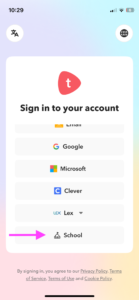
In the ParentOrbit app, tap the Toddle icon. This should automatically direct you to install the Toddle app, and then prompt you to login to the Prince of Peace portal.
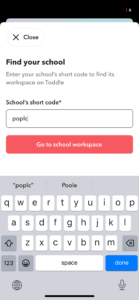
If the Prince of Peace portal isn’t automatically connected, use the following steps (please note: the layout may look a little different to the images below on various platforms).
Tap the ‘School’ Button:
Enter our school code: poplc
College Staff Orbit Phone App Login
For Prince of Peace College staff, using your mobile phone please scan the QR Code below or click this link to log into Staff Orbit.
Questions?
For Toddle & Parent Orbit App Enquiries — Please contact IT Support at itsupport@princeofpeace.qld.edu.au For Campus Specific Enquiries — Please contact your Campus at school@princeofpeace.qld.edu.au For Academic Or Student Enquiries — Please contact your child’s classroom teacher or Pastoral Care Teacher via Toddle. Families on the Senior Campus may also contact subject teachers directly via Toddle.





 1) Download the Parent Orbit app on your phone